"Web streaming experience with Snosh"
Select Product
AUDIOzilla
VIDEOzilla
Dexster
Photopus Pro
Recordzilla
Softdiv MP3 to WAV Converter
Product Information
Overview
Features
Screenshots
Review / Testimonials
System Requirements
FAQ
Download
Download Snosh
What's new
Purchase
Buy Now
Upgrade
Bundle
Educational Licensing
Bulk Licensing
Purchasing FAQ
Support
Support Form
Forum
Tutorials
FAQ
Company
Contact Us
Press Release
About Us
Join Our Monthly Newsletter:
Enter your email address:
Our software is clean from
spyware/adware/viruses
Snosh Tutorials:
Home
-
Tutorials
-
Export Progress
:
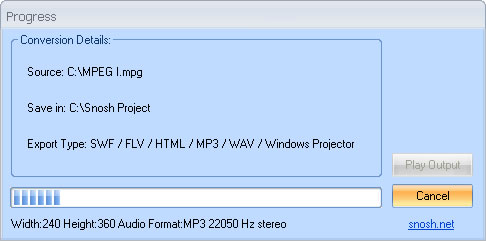
During the conversion, the progress form provides some useful encoding information and allow to play the output when conversion is completed.
Conversion Details:
Source
Original input file. It can be a video, audio or image file.
Save In
Output folder for the conversion. By default the output folder is C:\Snosh Project
Export Type
Indicate the export format type. It can be SWF, FLV, HTML, Windows Projector, MP3, and WAV
To play the output file, click on Play Output button.
Home
|
Features
|
Purchase
|
Tutorials
|
Support
|
Sitemap
|
Download
|
About us
Copyright © 2008- 2024 Softdiv Software Sdn Bhd. All Rights Reserved.